
AI Features
Search, chat, and coaching: how Bold's AI works and how to make it yours
Bold's AI is grounded in your videos. Every answer cites the exact moment in the exact video it came from, so your members can always check the source. This page explains what each AI feature does and how to tune the voice behind them.
The AI features at a glance
| Feature | What it does | Availability |
|---|---|---|
| Semantic search | Finds moments by meaning, not keywords: "how do I handle objections" finds the right clip even if nobody said those words | All plans |
| Per-video chat | Ask questions about a single video; answers cite timestamps | All plans |
| Library-wide AI Coach | Ask anything across your whole library; synthesizes answers from multiple videos, personalized to the member asking | Growth and Enterprise |
| Recommendations | Topic-based video recommendations for learning paths | via API / SDK |
| Metadata generation | Titles, teasers, descriptions, chapters, intelligence reports | All plans |
Plan availability
The library-wide AI Coach (cross-library answers with member personalization) is available on Growth and Enterprise plans, with a monthly answer volume included. Per-video chat and semantic search are on every plan.
Give your assistant a personality
Under Settings → Channel Settings → AI Assistant you set the basics: the assistant's name, avatar, and greeting message. This is what viewers see in the portal and embeds.
The deeper tuning lives under Settings → AI Settings:
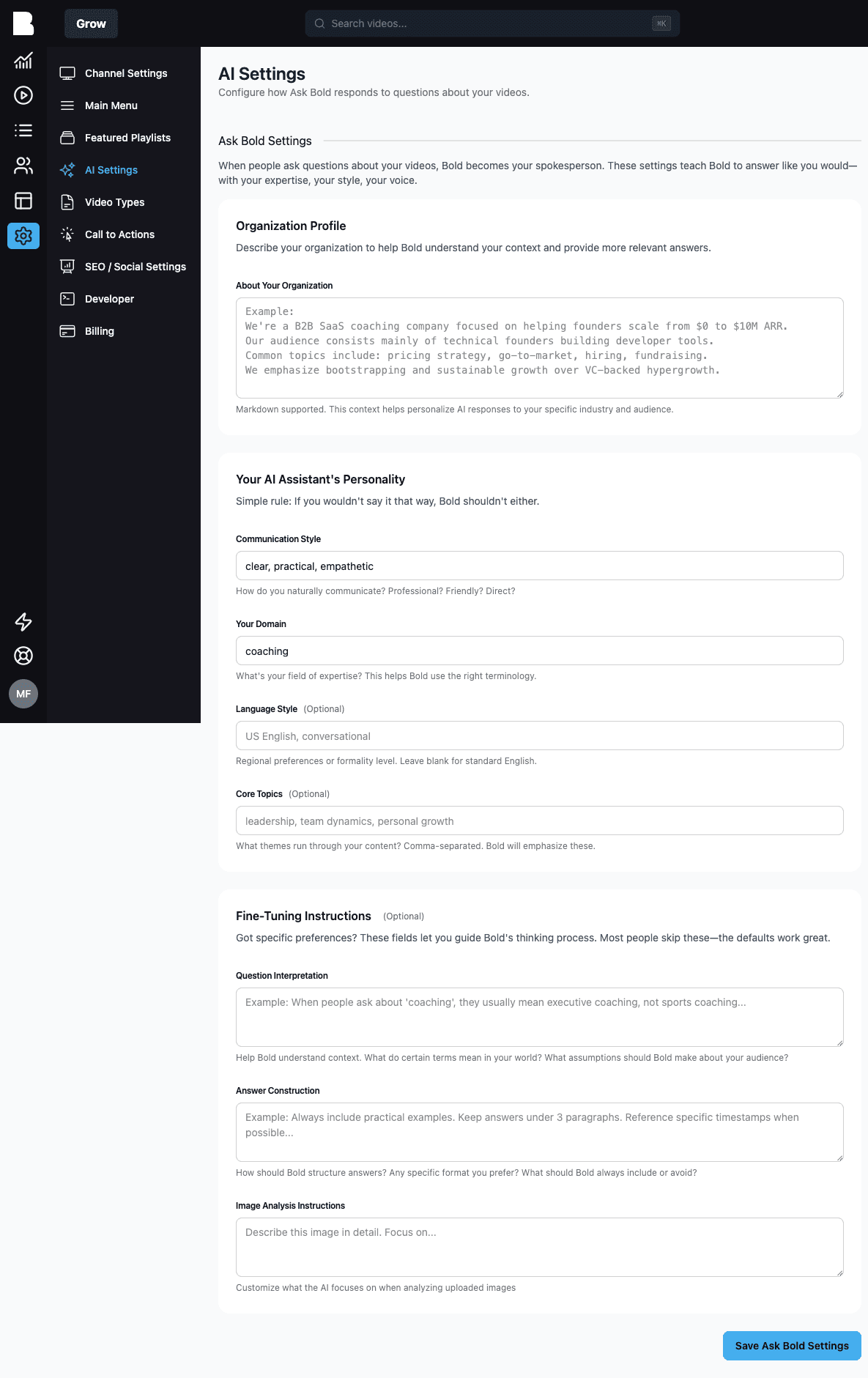
Organization Profile
Describe your organization, audience, and common topics (Markdown supported). This context makes answers relevant to your industry: a question about "pricing" means something different to a SaaS coach than to a wedding photographer.
Personality
Four short fields that shape the voice:
- Communication style: e.g. "clear, practical, empathetic"
- Field of expertise: so Bold uses the right terminology
- Language & formality: regional preferences, formality level
- Content themes: the threads running through your content
The rule of thumb Bold suggests: if you wouldn't say it that way, Bold shouldn't either.
Fine-tuning instructions (optional)
For specific preferences: how to interpret ambiguous questions, how to structure answers (length, format, timestamps), and what to focus on when analyzing uploaded images. Most channels never need these. The defaults work well.
Answer languages
Bold answers in your Default AI Answer Language (Settings → Channel Settings), but viewers can simply ask in another language and Bold follows their lead.
Where viewers meet the AI
- In your portal: the AI assistant and AI search (toggle under Portal → Navigation)
- In enhanced embeds: the chat panel (see Embedding)
- In your own app: via the AI endpoints or the SDK
The AI disclaimer
If you need legal or usage guidance under the chat input ("Answers are AI-generated…"), set it under Portal → AI → Chat Disclaimer.